Discover the Elegance of Slice: A Dainty Script Font for Web Design
As a web designer, I'm always on the lookout for fonts that can elevate a design and make it stand out. Recently, I had the pleasure of testing Slice, a stylish and dainty script font, in a real website layout. The results were nothing short of stunning. Let's dive into how Slice can transform your digital projects.
The Visual Charm of Slice
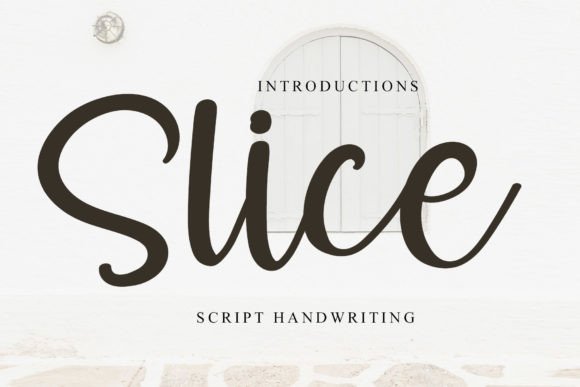
Slice is a premium font that brings a beautiful handwritten touch to any project. Its elegant, flowing lines and delicate curves give it a unique personality that feels both modern and timeless. The font's charm lies in its ability to add a personal, human touch to digital designs, making them feel more relatable and engaging.
When I first applied Slice to a hero section, the transformation was immediate. The font's graceful style instantly added a layer of sophistication and warmth to the page. It’s perfect for creating a memorable first impression and setting the tone for the entire user experience.
Using Slice in Web Layouts
One of the most effective ways to use Slice is in website headers and hero sections. The font's decorative nature makes it ideal for large, impactful titles that grab the user's attention. For example, in a creative portfolio or a boutique online store, Slice can be used to create a welcoming and inviting atmosphere.
- Hero Titles: Use Slice for the main headline in a hero section to create a strong visual impact and set the tone for the site.
- Section Headings: Apply Slice to section headings to maintain a consistent and elegant look throughout the page.
- Call-to-Action Areas: Incorporate Slice in call-to-action buttons or short phrases to add a touch of elegance and encourage user engagement.
In a recent project, I used Slice for the main heading of a coaching website. The font's graceful, handwritten style perfectly complemented the coach's personal and approachable brand. The result was a homepage that felt both professional and welcoming, effectively communicating the coach's message and values.
Readability and Responsive Design
While Slice is visually stunning, it's important to consider readability, especially in responsive layouts. The font works best for larger text sizes, such as headlines and section titles, where its intricate details can be fully appreciated. For smaller text, such as body copy or navigation labels, it's advisable to pair Slice with a clean, simple sans serif font to ensure optimal readability.
When testing Slice on mobile screens, I found that it maintained its elegance and legibility. However, it's crucial to test the font across different devices and screen sizes to ensure that it performs well in all scenarios. For instance, using Slice over an image banner requires careful consideration of color contrast and font size to ensure that the text remains readable.
Font Pairing and Brand Consistency
To create a balanced and cohesive design, Slice can be paired with a variety of other fonts. A popular combination is to use Slice for display purposes, such as headings and logos, and a simple sans serif font, like Roboto or Open Sans, for body text. This pairing ensures that the overall design is both visually appealing and functional.
For a more editorial or sophisticated look, you might consider pairing Slice with a classic serif font. This combination can work well for blog graphics, course pages, or any content that requires a more refined and traditional aesthetic.
In a recent redesign of a blog, I used Slice for the main heading and Lato for the body text. The result was a harmonious and elegant design that enhanced the blog's visual appeal and readability.
Practical Considerations and Best Practices
Before incorporating Slice into your web projects, it's essential to check the included styles, alternates, and file formats. Ensure that the font supports the necessary language sets and that you have the appropriate commercial license for your intended use. This is particularly important if you plan to use the font on client projects, online stores, or landing pages.
Additionally, consider the following best practices when using Slice:
- Test Responsively: Always test the font on various devices and screen sizes to ensure it looks great and is readable.
- Use for Impact: Reserve Slice for areas where it can make the most impact, such as headlines, banners, and call-to-action elements.
- Pair Wisely: Pair Slice with a clean, simple font for body text to maintain readability and balance.
- Check Licensing: Verify that you have the proper commercial license for the font before using it in client projects or selling digital products.
By following these guidelines, you can effectively leverage Slice to enhance the visual appeal and user experience of your web designs.
In conclusion, Slice is a versatile and charming script font that can add a touch of elegance and personality to your digital projects. Whether you're designing a creative portfolio, a boutique online store, or a coaching website, Slice can help you create a memorable and engaging user experience. Just remember to use it thoughtfully and pair it wisely to achieve the best results.